LCM’s Recommended
Desktop Weather Applications
Walter Robinson II, LCM
Copyrighted © All Rights Reserved ® 2003
Document may be used only with permission.
A Note About My
Recommendations
Obviously, we cannot and will not be liable for any problems that can be
incurred by those using the software applications we recommend here. I do not
have enough computers or time to try every application on every type of computer
with every type of operating system available today. Make sure that you check
the system requirements, and take a look at the Frequently
Asked Questions
(FAQs) on the suppliers’ websites. Lastly,
I also suggest that you look for any problem issues that are often mentioned on
the best websites that offer software applications to the public.
I recommend the following applications because I have used them and found
them to be easy to setup, effective, and trouble free.
The Weather Channel's Desktop Weather®
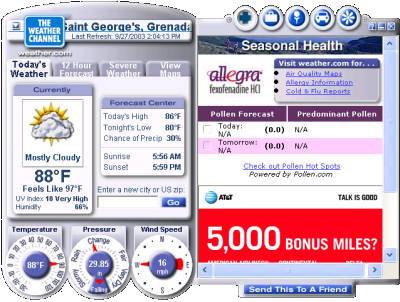
http://www.weather.com
(Click on the 'Weather Tools' Link in the
top right section of their navigational bar.)
Living here in the southern
Caribbean, it is wise to keep abreast on the tropical Atlantic during the rainy
season, which is also hurricane season (June thru November). Since
we live in 'hurricane alley,' there are several sites that I usually
check everyday to view radar images and read weather statements about any
weather than could be coming our way.
September of 2003, it suddenly
dawned on me that there was likely some neat little software application that
would sit quietly in my task tray while running in the background to keep me
posted on the weather. Several months back or so I had tried one such
application from ‘The Weather Channel (TWC),’ but it was
limited to the United States in scope, so I uninstalled it and forgot about it
for the time being.
Among others, I faithfully check the Weather Channel’s
website at least a couple of times a day for reports and images. I even placed a
constantly undated image from them on a page on my website that provides up-to-date weather information for Grenada and its possessions. (Click here to see)
One day late in August or early September 2003 when I visited their site, I
saw a really neat little animated graphic floating across my screen
promoting their ‘Desktop Weather®’
application. On the
page that described the application, I read the following;
“Desktop Weather gives you
FREE instant access to The Weather Channel with the current temperature
and severe weather alerts always on your desktop!”
I hoped that they had enhanced their software more and
expanded its coverage to include my region of the world, so I downloaded the
software and installed it. In a word, I loved it right off the bat.
However, the next day when I
turned my computer on, a couple of ‘pop-up’ ads suddenly appeared on my desktop
out of nowhere. I had not even accessed the web yet, though I was connected to
the net. Sure enough, it was the TWC’s Desktop Weather®
application that was generating the pop-ups. Grrrrrr! I thought this
application was supposed to be ‘FREE,’ not ‘adware’ supported by ‘pop-ups!
Interestingly, on another
page that promotes both the free and ‘premium’ pay version of Desktop
Weather, the Weather Channel’s website states; “The Weather Channel
is committed to the safety and privacy of our customers and certifies that these
products DO NOT include spyware" or "parasite" files.” Notice that they
did not mention ‘adware.’
Granted, I saw nothing offensive
in their pop-up advertisements. But that is all I remember about them because I
focused only on killing them as soon as they appeared without invitation on my
desktop.
Notwithstanding, Desktop
Weather® is top notch. It installed without any problems and it
is specifically informative for any area you choose. But I do not like getting
caught by surprise with adware, particularly coming from a top notch weather
reporting agency like The Weather Channel. They also use pop-up
ads on their website, but I use tools to kill those before they get before my
eyes. I do not mind the ads they embed on their website. Nor do I mind the ads
they regularly change and embed in their Desktop Weather
application’s right display window. But pop-ups on my desktop? That is
going too far for me.
I wrote them a letter of complaint
stating that they should have warned people about their adware pop-ups before
people go through the trouble of downloading and installing their software. I am
waiting to see what they say. In the mean time, if you don’t mind the pop-ups,
TWC’s Desktop Weather® is top
notch and worked flawlessly for me—before I uninstalled it.
Weather Watcher
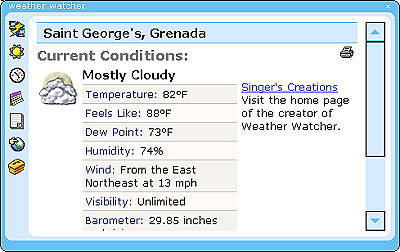
Click here or the image above
to go to the site to download.
Weather Watcher,
by
Singer's
Creations, seems to be another good desktop weather application. It
installed with no problems and was easy to setup. It has an icon that resides in
the task tray that reflects the current temperature. If you pass your mouse
cursor over it, you get a neat little balloon that briefly states the current
sky conditions, actual temperature, and ‘feels like’ (based upon humidity,
temperature, and wind) temperature. If you double click on the tray icon or the
link in the main application’s window, your browser will launch and display the
detailed extended forecast for your selected city as presented by The
Weather Channel.
Weather Watcher’s
main application display (screenshot above) does not have any fancy gages or
needles, but it gives all the details in clear text. As of writing this review I
had only been using the application for three hours or so, but it looks good and
seems to behave quite well. More importantly, it is doing exactly what I want.
Lastly, and even better,
Weather Watcher is truly FREE, including free from ads and
pop-ups.

Visitors have viewed this page since
April 1, 2004
(NOTE: All preexisting page counters were
reset to
zero when my server crashed in March of 2004.
It took until April 1, 2004 to get them working again.)
Copyright © 2000 Last Chance Ministries. All rights reserved.
Revised: May 02, 2006.
|